
characterswap h3 Workflow

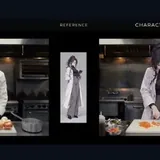
Experimental character-replacement by Akatz Labs. Input a video and picture to replace the character. No prompt is necessary. If source video doesn't have audio, please use /slot1:0 or it'll fail. ComfyUI doesn't provide dynamic detection for this. This is the built in prompt - if you prompt anything, this is overridden, so clone it if you wish to modify how it works for a similar result: Replace only the person in with the character in . Keep the replacement character's identity, outfit, and art style from . Preserve the source video's camera, background, lighting, objects, and all other people. Match the target person's position, scale, pose, and movement. Do not show the reference sheet or its background.
Kompatibel / Verfügbar in Graydient-betriebenen Apps





Optionen
| Option | Entspricht | Standard |
|---|---|---|
(prompt) | Prompt text | — |
/run:characterswap-h3 | Workflow shortcode | characterswap-h3 |
Verwendete Modelle
 characterswap h3 Modell importiert per Shortcode
/run:characterswap-h3 von ModelTrends Auf ModelTrends ansehen Für Entwickler (optional)
Beispiel-API-Snippet. Du kannst mit diesem Workflow deine eigene App für den persönlichen Gebrauch bauen. Auf Business-Plan upgraden, wenn du bereit bist, sie bereitzustellen. Siehe die vollständige Rendering-API-Dokumentation.
curl https://cloud.graydient.ai/api/v3/render/ \
  -X POST \
  -H "Content-Type: application/vnd.api+json" \
  -H "Accept: application/vnd.api+json" \
  -H "Authorization: Bearer $GRAYDIENT_TOKEN" \
  -d '{
    "prompt": "/workflow /run:characterswap-h3 ",
    "callback_url": "https://example.com/webhook/render"
}'So funktioniert es hinter den Kulissen. Das ist bereits für dich konfiguriert. Die Parameter in der obigen Tabelle werden in diese Slots eingesteckt, sodass du ändern kannst, wie es funktioniert und welche Modelle geladen werden. Du musst das nicht verstehen oder ändern – es funktioniert einfach, schon eingerichtet.
Diese Workflow-Seite listet den Shortcode, Optionen und ModelTrends-Downloads auf. Das vollständige Node-Diagramm ist mit dem Workflow-Download auf ModelTrends verfügbar. Das Node-Diagramm für diesen Workflow wird auf dieser Seite noch nicht angezeigt. Öffne es auf ModelTrends, um die Workflow-Datei und die geladenen Modelle herunterzuladen.
Alle Workflows: Leistungsstarke Workflows