
เวิร์กโฟลว์ moss
MOSS-Image: A 5B-parameter open diffusion model with layout control and text rendering in English and Chinese. Powered by Qwen3.5-9B and the FLUX.2 latent space. EXPERIMENTAL / NEW - EXPECT CHANGES Telegram Commands: /run:moss-image [prompt] - Generate an image from description or spatial layout /steps:50 - Sampling steps (default: 50, range: 15-100) /guidance:3.0 - Prompt guidance / CFG (default: 3.0, range: 1.5-6.0) /seed:42 - Reproducible random seed /size:1024x1024 - Output canvas size (multiples of 16, e.g. 1024x1024, 1280x768, 768x1280) /slot1:5.0 - Flow sampling shift (default: 5.0) Tips: - Text Rendering: Put text in quotes within the prompt or use newlines (\n) for line breaks. - Negative Prompt: Default filter cleans up artifacts (worst quality, bad anatomy, blurry, watermark). - Layout Control: Supports 4K token prompts and structured JSON bounding boxes.
รองรับ / ใช้งานได้ในแอปที่ใช้ Graydient





ตัวอย่างการเรนเดอร์
สร้างด้วยโมเดลที่เวิร์กโฟลว์นี้ใช้งาน แบ่งปันโดยผู้สร้างบน ModelTrends เลือกภาพขนาดย่อเพื่อดูภาพเรนเดอร์ขนาดใหญ่พร้อมพรอมต์ที่ใช้สร้าง

คำสั่งโดย CivitaiOfficial · moss
best quality, highres, 1girl, silver hair, green eyes, holding a glowing paper lantern, night festival, paper streamers, food stalls in the background, soft bokeh, detailed background, gentle smile, anime illustration
คำสั่งโดย CivitaiOfficial · moss
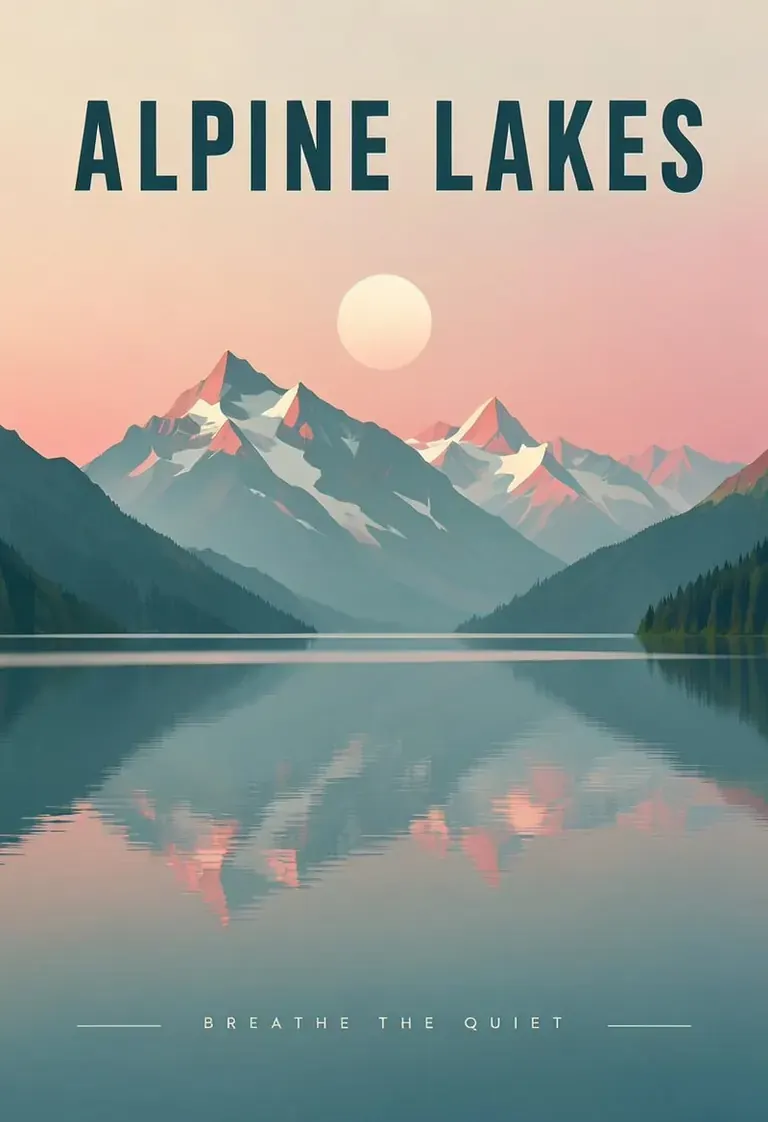
A minimalist travel poster of a still mountain lake at dawn, flat vector style with soft gradients. A bold title "ALPINE LAKES" across the top and the tagline "breathe the quiet" in small capitals along the bottom. Teal, cream and dusty pink palette, clean typography, centered composition.
คำสั่งโดย akizukirei608 · moss
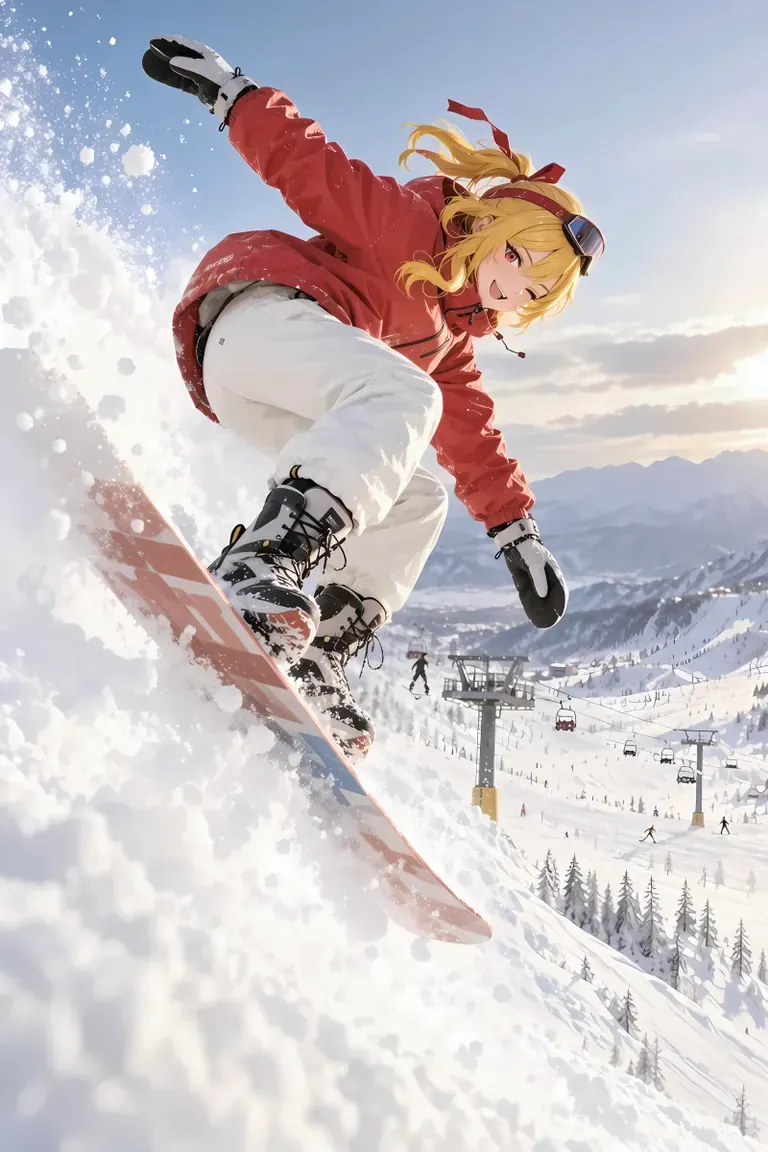
masterpiece,best quality, absurdres, anime style, cinematic lighting, natural shadow, very aesthetic, highest detail, detailed background, intricate scenery, depth of field, insane details, intricate, subsurface scattering, 1girl, kaela kovalskia, red eyes, red hair ribbon, red headband, jacket, snowboard, snowboarding, jumping, floating, outdoors, snow, ski resort, cinematic composition
 เรนเดอร์และพรอมต์จาก ModelTrends แคตตาล็อกโมเดลภาพและวิดีโอ AI
ตัวเลือก
| ตัวเลือก | แมปไปยัง | ค่าเริ่มต้น |
|---|---|---|
(prompt) | Prompt text | — |
/run:moss | Workflow shortcode | moss |
โมเดลที่ใช้
 moss โมเดลนำเข้าด้วย shortcode
/run:moss จาก ModelTrends ดูบน ModelTrends สำหรับนักพัฒนา (ไม่บังคับ)
ตัวอย่างโค้ด API คุณสามารถสร้างแอปของคุณเองด้วยเวิร์กโฟลว์นี้เพื่อใช้ส่วนตัว อัปเกรดเป็นแผนธุรกิจ เมื่อพร้อมใช้งาน ดู เอกสาร API การเรนเดอร์ฉบับเต็ม
curl https://cloud.graydient.ai/api/v3/render/ \
  -X POST \
  -H "Content-Type: application/vnd.api+json" \
  -H "Accept: application/vnd.api+json" \
  -H "Authorization: Bearer $GRAYDIENT_TOKEN" \
  -d '{
    "prompt": "/workflow /run:moss ",
    "callback_url": "https://example.com/webhook/render"
}'นี่คือวิธีการทำงานเบื้องหลัง ฉันได้ตั้งค่ามาให้คุณแล้ว พารามิเตอร์ในตารางด้านบนจะเชื่อมต่อกับช่องเหล่านี้ ช่วยให้คุณเปลี่ยนวิธีการทำงานและเลือกโมเดลที่จะโหลดได้ คุณไม่จำเป็นต้องเข้าใจหรือแก้ไขตรงนี้ - มันทำงานได้เลย ตั้งค่าไว้แล้ว
หน้านี้แสดง shortcode ตัวเลือกและดาวน์โหลด ModelTrends กราฟโหนดเต็มมีให้พร้อมดาวน์โหลดเวิร์กโฟลว์บน ModelTrends กราฟโหนดของเวิร์กโฟลว์นี้ยังไม่ได้วาดบนหน้านี้ เปิดดูบน ModelTrends เพื่อดาวน์โหลดไฟล์เวิร์กโฟลว์และโมเดลที่โหลด
เวิร์กโฟลว์ทั้งหมด: เวิร์กโฟลว์ทรงพลัง