
วิธีนำเข้าโมเดล Civitai และเรนเดอร์บน Graydient
Graydient โฮสต์โมเดลเปิดบนคลาวด์ GPU ด้วยราคาคงที่รายเดือน คุณนำโมเดล Civitai ที่ต้องการ: วางลิงก์หรือติดตั้งจาก ModelTrends ลงชื่อเข้าใช้ Hugging Face เมื่อผู้สร้างจำกัดไฟล์ และเรนเดอร์ได้ไม่จำกัด ไม่มีการคิดค่าบริการต่อภาพและไม่มีแบบฟอร์มขอให้เราติดตั้งโมเดลให้
This is not the ModelTrends one-click catalog. If the model is already listed on ModelTrends with a ShortCode, install it there instead: how to install models from ModelTrends on Graydient.
This page is Graydient Model Import in your web dashboard. If the model is not on ModelTrends and you install through PirateDiffusion (Telegram or web editor), follow install a Civitai model that is not on ModelTrends (PirateDiffusion guide) for Hugging Face upload and the /concept /edit form instead.
สิ่งที่คุณต้องมี
- แผน Graydient ที่ใช้งานอยู่ (Images, Video Plus หรือ Video Max) ทุกแผนรวม Model Import และเรนเดอร์ไม่จำกัดภายในฟีเจอร์ของแผน
- URL หน้าโมเดล Civitai หรือโมเดลเดียวกันบน ModelTrends เมื่อมีในนั้น
- บัญชี Hugging Face ฟรีเมื่อดาวน์โหลดน้ำหนักจาก Hugging Face หรือผู้สร้างจำกัดการเข้าถึง คุณต้องยอมรับใบอนุญาตบน Hugging Face; Graydient จะดึงไฟล์เข้าห้องสมุดของคุณ
- เบราว์เซอร์หรือโทรศัพท์ คุณไม่ต้องมี GPU ในเครื่อง
Where it happens in your dashboard
Model Import lives in your Graydient web dashboard (library or drive area, depending on the app skin). The screenshots below show the dashboard home, the workflow picker and the unified library screen you use after import.
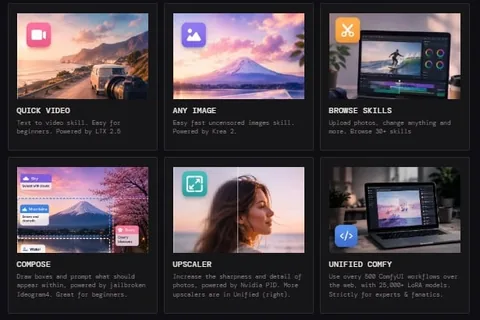
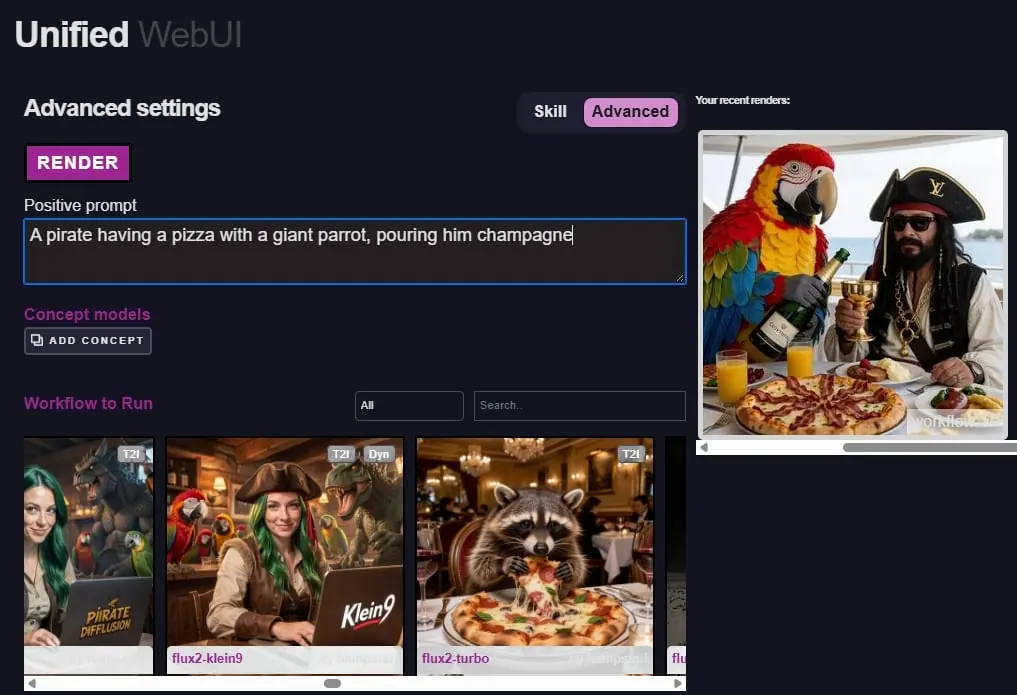
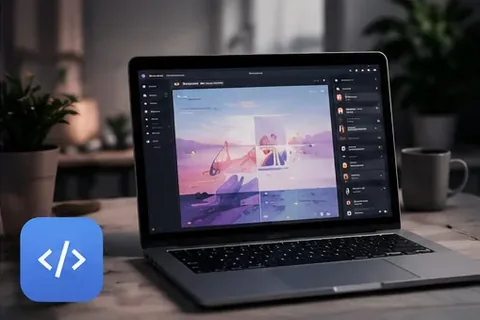
นำเข้าโมเดลในเจ็ดขั้นตอน
กระบวนการทั้งหมดอยู่ในแดชบอร์ดของคุณหลังจาก เข้าสู่ระบบ Graydient Graydient ไม่ติดตั้งโมเดลจากตั๋วซัพพอร์ตหรือคำขอทางอีเมล
- เลือกโมเดลบน Civitai (หรือบน ModelTrends เมื่อมีในนั้น) เปิดหน้าของโมเดลและคัดลอกที่อยู่จากเบราว์เซอร์ของคุณ
- ใน Graydient เปิด Model Import (บางครั้งเรียกจากไลบรารีหรือพื้นที่ไดรฟ์ในเว็บแอป) วางลิงก์ Civitai หรือ Hugging Face
- ถ้า Civitai แสดงหลายเวอร์ชัน ให้เลือกเวอร์ชันที่ใช้บน Civitai ก่อนยืนยันการนำเข้า
- ถ้า Model Import เปิด Hugging Face ลงชื่อเข้าใช้ด้วยบัญชี Hugging Face ของคุณและยอมรับเงื่อนไขใบอนุญาตของโมเดล ขั้นตอนนี้เป็นระหว่างคุณกับ Hugging Face; Graydient ดาวน์โหลดเฉพาะไฟล์ที่คุณได้รับอนุญาต
- รอจนโฮสต์เสร็จ LoRA ขนาดเล็กมักพร้อมในไม่กี่นาที; checkpoint ขนาดใหญ่ใช้เวลานานกว่า ความคืบหน้าจะแสดงในไลบรารีของคุณ
- จดคำกระตุ้นและน้ำหนักที่แนะนำในหน้า Civitai หรือ ModelTrends ให้ตรงกับครอบครัวโมเดลฐาน (SDXL กับ SDXL, Flux กับ Flux เป็นต้น)
- เรนเดอร์จาก Prism, SpyGlass, Unified Editor, PirateDiffusion บน Telegram, Vector บน Discord หรือ API ส่วนตัวบน Video Max ใช้โมเดลได้บ่อยเท่าที่ต้องการ แผนคงที่ไม่คิดค่าบริการต่อภาพ
เมื่อเกี่ยวข้องกับ Hugging Face
หลาย checkpoint และ LoRA ของ Civitai เก็บไฟล์ .safetensors จริงไว้บน Hugging Face ผู้สร้างมักต้องให้คุณยอมรับใบอนุญาตก่อนดาวน์โหลด
- สร้างบัญชี Hugging Face ถ้าคุณยังไม่มี
- บนหน้าของโมเดล Hugging Face อ่านใบอนุญาตและคลิกยอมรับถ้าคุณเห็นด้วย
- กลับไปที่ Graydient Model Import และทำขั้นตอนลงชื่อเข้าใช้เมื่อถูกถาม ถ้านำเข้าไม่สำเร็จ ตรวจสอบว่าคุณยอมรับใบอนุญาตบน Hugging Face และลิงก์ชี้ไปยังไฟล์ที่คุณคาดหวัง
If you already downloaded the .safetensors file
Do not hotlink Civitai file URLs: they may require a Civitai login or disappear. For PirateDiffusion /concept /edit, upload to Hugging Face and copy the download link as shown in install a Civitai model that is not on ModelTrends (PirateDiffusion guide). For Graydient Model Import, paste the resolve URL into the dashboard import form.
- Create a Hugging Face account and a public model or LoRA repository.
- Upload the .safetensors file. Use the resolve URL pattern: huggingface.co/your-user/your-repo/resolve/main/your-file.safetensors
- Paste that resolve URL into Model Import. Fill concept name, prompt token, model family and optional trigger words in the dashboard form.
After import
Hosted models stay in your online library until you delete them.
- Use the model as often as your plan allows; the flat price does not charge per picture.
- Stack LoRAs and try many seeds. See ใช้งานโมเดล Civitai ไม่จำกัดบน Graydient for how flat pricing compares to Civitai Buzz.
- Delete models you no longer need to free storage, or upgrade in the พอร์ทัลการชำระเงิน.
เคล็ดลับประหยัดเวลา
- แนะนำ .safetensors ที่มีขนาดต่ำกว่า 25GB ไฟล์ใหญ่หรือฟอร์แมตแปลกอาจนำเข้าไม่ได้
- ลบโมเดลที่ไม่ใช้เพื่อเพิ่มพื้นที่เก็บ หรืออัปเกรดแผนใน พอร์ทัลการชำระเงิน
- อ่านใบอนุญาตของผู้สร้างแต่ละคนก่อนใช้เชิงพาณิชย์
บริการที่ปิดหรือไม่ใช่น้ำหนักเปิดที่ขายผ่าน Civitai ไม่สามารถนำเข้าเป็นไฟล์ได้ นโยบายการใช้งานที่ยอมรับได้ ของเรามีผลกับทุกสิ่งที่คุณเรนเดอร์
คำถาม
Graydient สามารถติดตั้งโมเดลถ้าฉันส่งอีเมลหาฝ่ายสนับสนุนได้ไหม?
ไม่ได้ การนำเข้าเป็นบริการด้วยตัวเองผ่าน Model Import หรือ ModelTrends ฝ่ายสนับสนุนช่วยเรื่องบัญชีหรือการชำระเงินได้ แต่ไม่ใช่การโฮสต์โมเดลแทนคุณ
ฉันต้องมีบัญชี Civitai ไหม?
ไม่จำเป็นถ้าคุณแค่จะวางลิงก์โมเดลสาธารณะใน Model Import แต่คุณต้องมีบัญชี Hugging Face เมื่อดาวน์โหลดถูกจำกัดบน Hugging Face
นี่แตกต่างจากการสร้างบน Civitai อย่างไร?
บน Civitai คุณจ่าย Buzz ต่อการสร้างแต่ละครั้ง บน Graydient คุณจ่ายราคาเหมาจ่ายรายเดือนและเรนเดอร์ได้ตามแผนของคุณ รวมถึงโมเดลที่คุณนำเข้าเองด้วย
ฉันจะเรียนรู้เกี่ยวกับราคาคงที่และการคืนเงินได้ที่ไหน?
ดูที่ แผนและราคา บนหน้าแรกและ อัตราคงที่ vs เครดิต สำหรับการเปรียบเทียบแบบไม่จำกัดกับระบบเครดิต ทุกแผนมีการรับประกันคืนเงินภายใน 7 วัน