
CivitaiモデルをGraydientにインポートしてレンダリングする方法
Graydientは定額の月額料金でGPUクラウド上にオープンモデルをホストしています。使いたいCivitaiモデルを持ち込み、リンクを貼り付けるかModelTrendsからインストール。クリエイターがファイルを制限している場合はHugging Faceでサインインし、好きなだけレンダリング可能。画像ごとの課金やモデルインストール依頼フォームはありません。
This is not the ModelTrends one-click catalog. If the model is already listed on ModelTrends with a ShortCode, install it there instead: how to install models from ModelTrends on Graydient.
This page is Graydient Model Import in your web dashboard. If the model is not on ModelTrends and you install through PirateDiffusion (Telegram or web editor), follow install a Civitai model that is not on ModelTrends (PirateDiffusion guide) for Hugging Face upload and the /concept /edit form instead.
必要なもの
- 有効なGraydientプラン(Images、Video Plus、またはVideo Max)。すべてのプランにModel Importとプラン内での無制限レンダリングが含まれます。
- CivitaiモデルページのURL、またはModelTrendsに掲載されている同じモデルのURL。
- Hugging Faceから重みをダウンロードする場合やクリエイターがアクセスを制限している場合は無料のHugging Faceアカウント。Hugging Faceでライセンスに同意し、Graydientがファイルをあなたのライブラリに取得します。
- ブラウザまたはスマホ。ローカルGPUは不要です。
Where it happens in your dashboard
Model Import lives in your Graydient web dashboard (library or drive area, depending on the app skin). The screenshots below show the dashboard home, the workflow picker and the unified library screen you use after import.
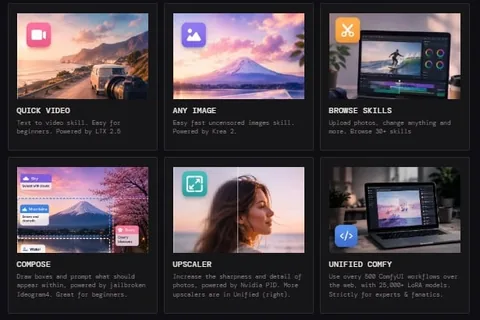
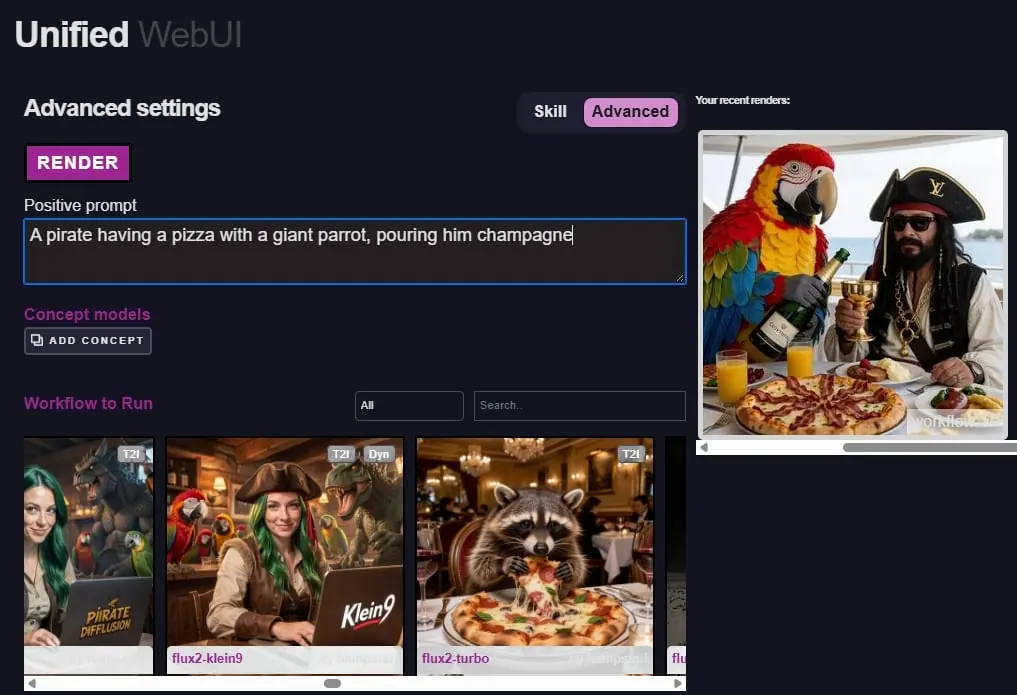
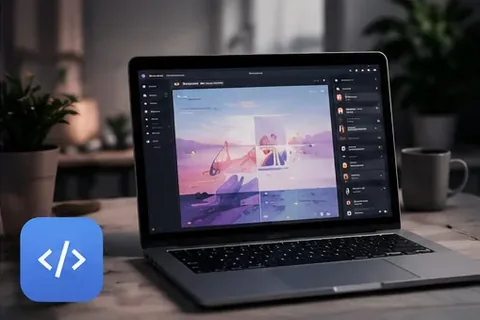
7ステップでモデルをインポート
すべての操作はGraydientにログイン後のダッシュボード内で行います。Graydientはサポートチケットやメールでのモデルインストール依頼には対応しません。
- Civitai(またはModelTrendsに掲載されている場合はそちら)でモデルを選び、モデルページを開いてブラウザのアドレスをコピー。
- GraydientでModel Importを開く(ウェブアプリのライブラリやドライブエリアからも開けることがあります)。CivitaiまたはHugging Faceのリンクを貼り付け。
- Civitaiで複数のバージョンが表示される場合は、インポート前に使用するバージョンを選択。
- Model ImportがHugging Faceを開いたら、Hugging Faceアカウントでサインインし、モデルのライセンスに同意。このステップはあなたとHugging Face間のもので、Graydientは許可されたファイルのみをダウンロードします。
- ホスティングが完了するまで待ちます。小さなLoRAは数分で準備完了、大きなチェックポイントは時間がかかることがあります。進行状況はライブラリに表示されます。
- CivitaiまたはModelTrendsのページにあるトリガーワードと推奨ウェイトをメモ。ベースモデルファミリー(SDXLはSDXL、FluxはFluxなど)を合わせてください。
- Prism、SpyGlass、Unified Editor、TelegramのPirateDiffusion、DiscordのVector、またはVideo Maxの個人APIからレンダリング。モデルは何度でも使え、定額プランは画像ごとの課金なし。
Hugging Faceが関わる場合
多くのCivitaiチェックポイントやLoRAは実際の.safetensorsファイルをHugging Faceに保存しています。クリエイターはダウンロード前にライセンス同意を求めることが多いです。
- まだ持っていなければHugging Faceアカウントを作成。
- モデルのHugging Faceページでライセンスを読み、同意する場合は承諾をクリック。
- GraydientのModel Importに戻り、促されたらサインインを完了。インポートに失敗したら、Hugging Faceでライセンスに同意したか、リンクが期待するファイルを指しているか確認。
If you already downloaded the .safetensors file
Do not hotlink Civitai file URLs: they may require a Civitai login or disappear. For PirateDiffusion /concept /edit, upload to Hugging Face and copy the download link as shown in install a Civitai model that is not on ModelTrends (PirateDiffusion guide). For Graydient Model Import, paste the resolve URL into the dashboard import form.
- Create a Hugging Face account and a public model or LoRA repository.
- Upload the .safetensors file. Use the resolve URL pattern: huggingface.co/your-user/your-repo/resolve/main/your-file.safetensors
- Paste that resolve URL into Model Import. Fill concept name, prompt token, model family and optional trigger words in the dashboard form.
After import
Hosted models stay in your online library until you delete them.
- Use the model as often as your plan allows; the flat price does not charge per picture.
- Stack LoRAs and try many seeds. See GraydientでCivitaiモデルを無制限に実行 for how flat pricing compares to Civitai Buzz.
- Delete models you no longer need to free storage, or upgrade in the 請求ポータル.
時間を節約するヒント
- 25GB以下の.safetensorsを優先。非常に大きいファイルや珍しい形式はインポートできない場合があります。
- 使わなくなったモデルは削除してストレージを空けるか、請求ポータルでプランをアップグレード。
- 商用利用前に各クリエイターのライセンスを必ず確認。
Civitai経由で販売されるクローズドまたは非オープンウェイトのサービスはファイルとしてインポートできません。レンダリングするすべてに当社の許容使用ポリシーが適用されます。
よくある質問
サポートにメールすればGraydientがモデルをインストールしてくれますか?
いいえ。インポートはModel ImportまたはModelTrendsのセルフサービスです。サポートはアカウントや請求の質問には対応しますが、代理でモデルをホストすることはありません。
Civitaiアカウントは必要ですか?
Model Importに公開モデルのリンクを貼るだけなら不要です。Hugging Faceでダウンロードが制限されている場合はHugging Faceアカウントが必要です。
Civitaiで生成するのと何が違いますか?
Civitaiでは生成ごとにBuzzで支払いますが、Graydientは月額定額料金でプランの範囲内で無制限にレンダリングでき、インポートしたモデルも使えます。
定額料金や返金についてはどこで知れますか?
ホームページのプランと料金と定額制とクレジット制の違いで無制限プランとクレジット制の比較を確認してください。すべてのプランに7日間の返金保証が付いています。