
如何匯入 Civitai 模型並在 Graydient 上渲染
Graydient 在其 GPU 雲端以固定月費託管開放模型。你帶來想用的 Civitai 模型:貼上連結或從 ModelTrends 安裝,若創作者限制檔案則以 Hugging Face 登入並接受授權,然後無限渲染。無每張圖片計費,也無需申請我們安裝模型。
This is not the ModelTrends one-click catalog. If the model is already listed on ModelTrends with a ShortCode, install it there instead: how to install models from ModelTrends on Graydient.
This page is Graydient Model Import in your web dashboard. If the model is not on ModelTrends and you install through PirateDiffusion (Telegram or web editor), follow install a Civitai model that is not on ModelTrends (PirateDiffusion guide) for Hugging Face upload and the /concept /edit form instead.
你需要的條件
- 有效的 Graydient 計劃(Images、Video Plus 或 Video Max)。每個計劃均包含 Model Import 及計劃內功能的無限渲染。
- Civitai 模型頁面 URL,或該模型在 ModelTrends 上的頁面(若有列出)。
- 當權重從 Hugging Face 下載或創作者限制存取時,需要免費的 Hugging Face 帳號。你需在 Hugging Face 接受授權;Graydient 會將檔案抓取到你的庫中。
- 瀏覽器或手機。無需本地 GPU。
Where it happens in your dashboard
Model Import lives in your Graydient web dashboard (library or drive area, depending on the app skin). The screenshots below show the dashboard home, the workflow picker and the unified library screen you use after import.

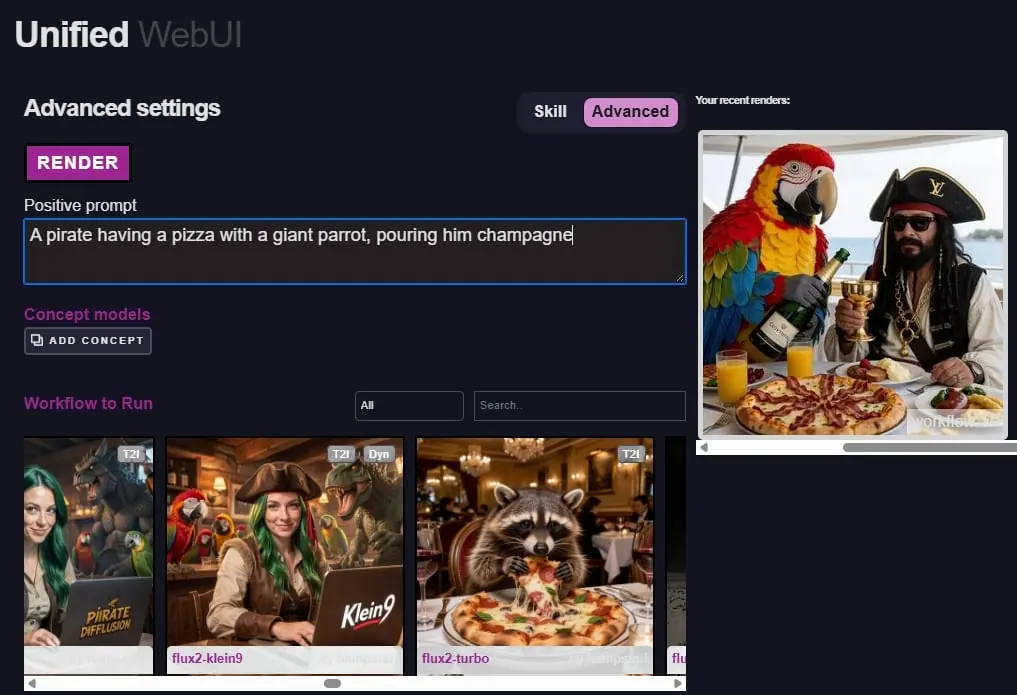

七步驟匯入模型
整個流程在你儀表板中,登入後 登入 Graydient 即可。Graydient 不會透過客服工單或電子郵件安裝模型。
- 在 Civitai(或 ModelTrends 上架時)選擇模型。開啟模型頁面,從瀏覽器複製網址。
- 在 Graydient 開啟 Model Import(有時標示於網頁應用的庫或硬碟區)。貼上 Civitai 或 Hugging Face 連結。
- 若 Civitai 顯示多個版本,請在確認匯入前選擇你要使用的版本。
- 若 Model Import 開啟 Hugging Face,請用你的 Hugging Face 帳號登入並接受模型授權條款。此步驟是你與 Hugging Face 之間的操作;Graydient 僅下載你有權限取得的檔案。
- 等待託管完成。小型 LoRA 通常幾分鐘內完成;大型檢查點可能較久。進度會顯示在你的庫中。
- 注意 Civitai 或 ModelTrends 頁面上的觸發詞與建議權重。匹配基礎模型系列(SDXL 配 SDXL,Flux 配 Flux,依此類推)。
- 從 Prism、SpyGlass、Unified Editor、Telegram 上的 PirateDiffusion、Discord 上的 Vector,或 Video Max 的個人 API 進行渲染。可隨意使用模型;固定方案不按圖片收費。
涉及 Hugging Face 時
許多 Civitai 的檢查點和 LoRA 將實際的 .safetensors 檔案存放在 Hugging Face。創作者通常要求你在下載前接受授權。
- 如果沒有 Hugging Face 帳號,請先建立一個。
- 在模型的 Hugging Face 頁面,閱讀授權條款並在同意後點擊接受。
- 返回 Graydient 模型匯入,並在提示時完成登入步驟。若匯入失敗,請確認你已在 Hugging Face 接受授權,且連結指向你預期的檔案。
If you already downloaded the .safetensors file
Do not hotlink Civitai file URLs: they may require a Civitai login or disappear. For PirateDiffusion /concept /edit, upload to Hugging Face and copy the download link as shown in install a Civitai model that is not on ModelTrends (PirateDiffusion guide). For Graydient Model Import, paste the resolve URL into the dashboard import form.
- Create a Hugging Face account and a public model or LoRA repository.
- Upload the .safetensors file. Use the resolve URL pattern: huggingface.co/your-user/your-repo/resolve/main/your-file.safetensors
- Paste that resolve URL into Model Import. Fill concept name, prompt token, model family and optional trigger words in the dashboard form.
After import
Hosted models stay in your online library until you delete them.
- Use the model as often as your plan allows; the flat price does not charge per picture.
- Stack LoRAs and try many seeds. See 在 Graydient 無限運行 Civitai 模型 for how flat pricing compares to Civitai Buzz.
- Delete models you no longer need to free storage, or upgrade in the 帳單入口.
節省時間的小技巧
- 優先使用小於 25GB 的 .safetensors。非常大的檔案或不常見格式可能無法匯入。
- 刪除不再使用的模型以釋放儲存空間,或在 帳單入口 升級方案。
- 商業使用前請閱讀每位創作者的授權條款。
透過 Civitai 銷售的封閉或非開放權重服務無法作為檔案匯入。我們的 可接受使用政策 適用於你所渲染的所有內容。
常見問題
我寄信給客服,Graydient 可以幫我安裝模型嗎?
不行。匯入是透過模型匯入或 ModelTrends 自助完成。客服能協助帳號或帳務問題,但不會代為託管模型。
我需要 Civitai 帳號嗎?
將公開模型連結貼到模型匯入不需要。若下載受限於 Hugging Face,則需要 Hugging Face 帳號。
這和在 Civitai 生成有什麼不同?
Civitai 生成需付 Buzz 費用。Graydient 則是固定月費,依方案不限次數渲染,包括你自行匯入的模型。