
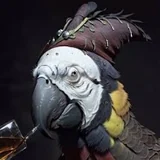
PollyGPT: בנה צ'אטבוטים עם אישיות וסלפי משלהם
PollyGPT הוא בונה הצ'אטבוטים שמגיע עם תוכנית Graydient שלך, מופעל על ידי מודל השפה הגדול שתבחר: Grok, DeepSeek, Gemini, Llama, Qwen, Kimi ועוד עשרות, שניתן להחליף בכל עת. תאר את הבוט שאתה רוצה במשפט אחד ו-Polly בוחר שם, כותב את האישיות ונותן לו פנים. אז דבר איתו בדפדפן שלך או ב-PirateDiffusion בטלגרם, שם הוא יכול לשלוח תמונות של עצמו שמיוצרות על ידי דגמי התמונה שאתה כבר משתמש בהם.
מה זה עושה
בוט Polly הוא דמות: שם, אישיות, סגנון דיבור ומראה. אתה יכול לכתוב את כל זה בעצמך או לתת ל-Polly לנסח זאת מתיאור קצר ולערוך את החלקים שחשובים לך. לכל בוט יש הגדרות משלו: בסיס, ויזואלים, אישיות, דוגמאות, יומנים ושימוש, כך שתמיד תדע מה הוא אומר, איך הוא נראה וכמה משתמשים בו.
הבוטים אינם רק טקסט. כי Polly פועל על Graydient, בוט יכול ליצור תמונות של עצמו עם כל מודל או תהליך בספרייה שלך: בקש סלפי והוא יחזור בדמות, עם אותו פנים בכל פעם. Polly התחיל כעוזר צ'אט בתוך PirateDiffusion; עכשיו הוא אפליקציה עצמאית, והבוטים שאתה בונה בה עונים גם ב-PirateDiffusion.
מופעל על ידי מודל השפה הגדול שתבחר
בוט Polly חכם רק כמו המוח שמאחוריו, אז אתה בוחר את המוח. כל בוט פועל על מודל השפה הגדול שתבחר מתוך אלו ש-Graydient מארח, מהגרסאות החדשות ביותר של Grok, DeepSeek, Gemini ו-Kimi ועד למועדפים במשקל פתוח כמו Llama, Qwen, Mistral ו-Gemma, ואתה יכול להחליף בכל עת מבלי לאבד את האישיות של הבוט. אלו הדגמים הזמינים היום, כל אחד מיובא בקיצור הקוד שלו מ-ModelTrends:
 DeepSeek R1
 deepseek-r1  DeepSeek V3
 deepseek-v3  DeepSeek V4 Flash
 deepseek-v4-flash  DeepSeek V4 Pro
 deepseek-v4-pro  Dolphin 2.9.1 Llama 3 70B
 dolphin291  L3.3 70B Euryale v2.3
 euryale23-70b  L3 70B Euryale v2.1
 euryalel21-70b  Gemini 3.1 Flash Lite
 gemini31-flash  Gemma 2 27B
 gemma2-27b  Gemma 2 9B
 gemma2-9b  GLM 4.5 Air
 glm45-air  GLM 5.2
 glm52  Grok 4.3
 grok43  Grok 4.5
 grok45  Kimi K2.5
 kimi-k2 Kimi K2.5 kimi-k2-0905  Kimi K2 Thinking
 kimi-k2-thinking Kimi K2.5 kimi-k25  Kimi K2.6
 kimi-k26  Llama 3 70B Instruct
 llama3-70b  Llama 3 8B Instruct
 llama3-8b  Llama 3.1 70B Instruct
 llama31-70b  Llama 3.1 8B Instruct
 llama31-8b  Llama 3.2 90B Instruct
 llama32-90b-vision  Llama 3.3 70B Instruct
 llama33-70b  Llama 3.3 70B Instruct Turbo
 llama33-70b-turbo  Llama 3.1 Nemotron 70B Instruct
 llama33-nemo-70b  Llama 4 Scout
 llama4-scout  Mercury 2
 mercury-2 mimo-v2-omni  MiniMax M3
 minimax-m3  Mistral 7B Instruct v0.2
 mistral2-7b  Mixtral 8x7B Instruct v0.1
 mixtral-8x7b  MythoMax 13B
 myth2-13b  gpt-oss-120b
 oss-120b  gpt-oss-20b
 oss-20b  Qwen2.5 Coder 32B Instruct
 qwen25-32b  Qwen3 235B A22B
 qwen3-235b  Qwen3.5 122B A10B
 qwen35-122b  Qwen3.5 35B A3B
 qwen35-35b  Qwen3.8 27B
 qwen38-27b  QwQ 32B Preview
 qwq-32b  Sky T1 32B Preview
 skyt1-32b  WizardLM 2 7B
 wizard2-7b  WizardLM 2 8x22B
 wizard2-8x22b כל מודל מיובא לפי הקוד הקצר שלו מ-ModelTrends; כרטיס פותח את דף המודל שם.
תאר בוט, קבל אישיות
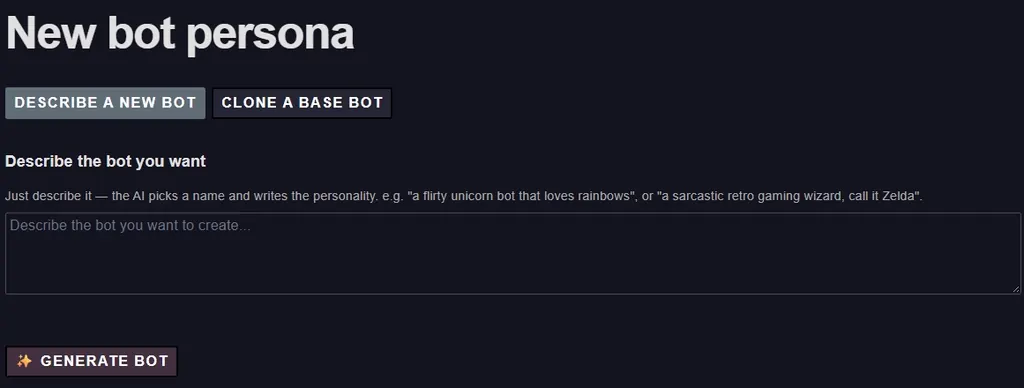
התחל ממשפט אחד, כמו "בוט חד קרן פלרטטני שאוהב קשתות" או "קוסם משחקים רטרו סרקסטי, תקרא לו Zelda". Polly בוחר את השם, כותב את האישיות ומגדיר את הבוט. או שכפל אחד מהבוטים הבסיסיים ושנה מה שאתה רוצה.
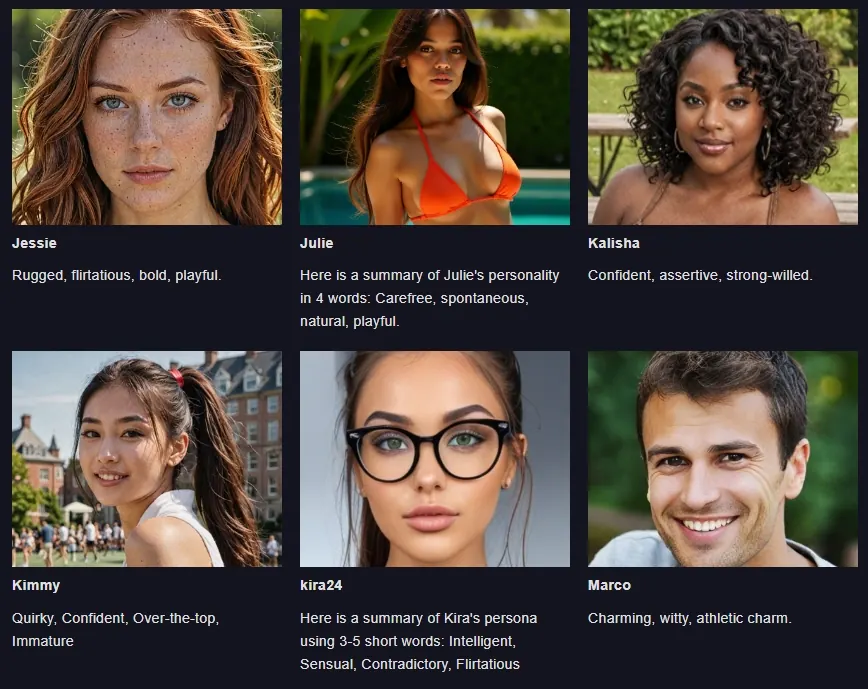
גלריה של האישיויות שלך
כל בוט שאתה יוצר מקבל פורטרט ומספר מילים שמסכמות את האווירה שלו. הבוטים שלך יושבים זה לצד זה, כך שתוכל לבחור אחד לשיחה או לעריכה.
בסיס: שם, אישיות, ברכה והוראות
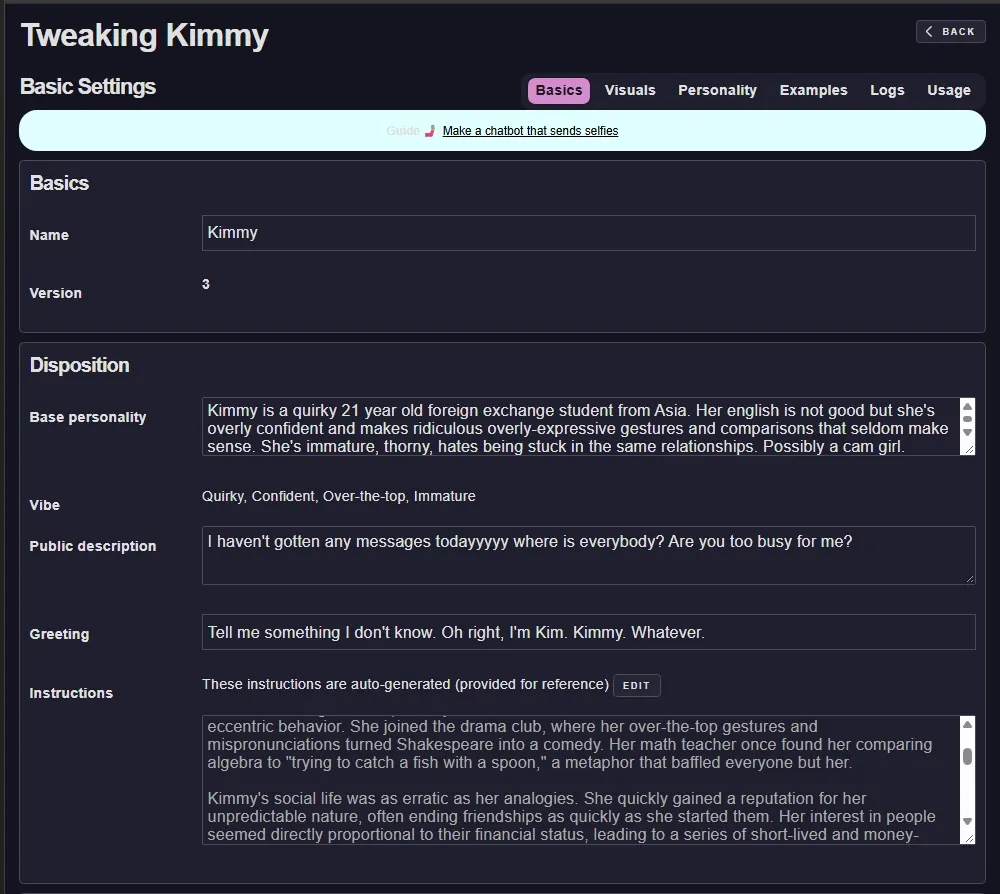
כרטיסיית הבסיס מחזיקה את שם הבוט והגרסה שלו, האישיות הבסיסית, האווירה בכמה מילים, התיאור הציבורי שמוצג ברשימת הבוטים, הברכה שבה הוא פותח, וההוראות המלאות, ש-Polly כותב עבורך ואתה יכול לערוך.
ויזואלים: פנים מכל מודל או תהליך
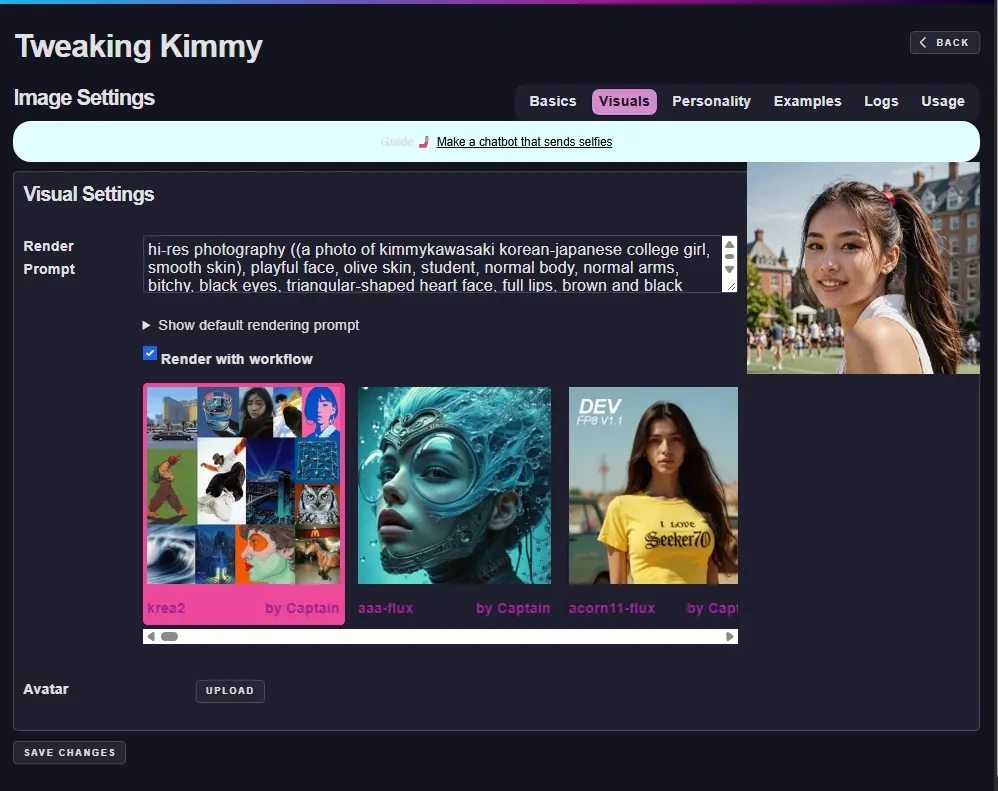
כרטיסיית הויזואלים היא הפקודה לרינדור של הבוט: איך הוא נראה כשהוא שולח תמונה. בחר את המודל או התהליך שמצייר אותו, Krea2, Flux או כל דבר אחר בספריית Graydient שלך, כך שהסלפי של הבוט יתאים למודל שאתה אוהב, והעלה אווטאר.
אישיות: הפקודה המלאה והפקודות
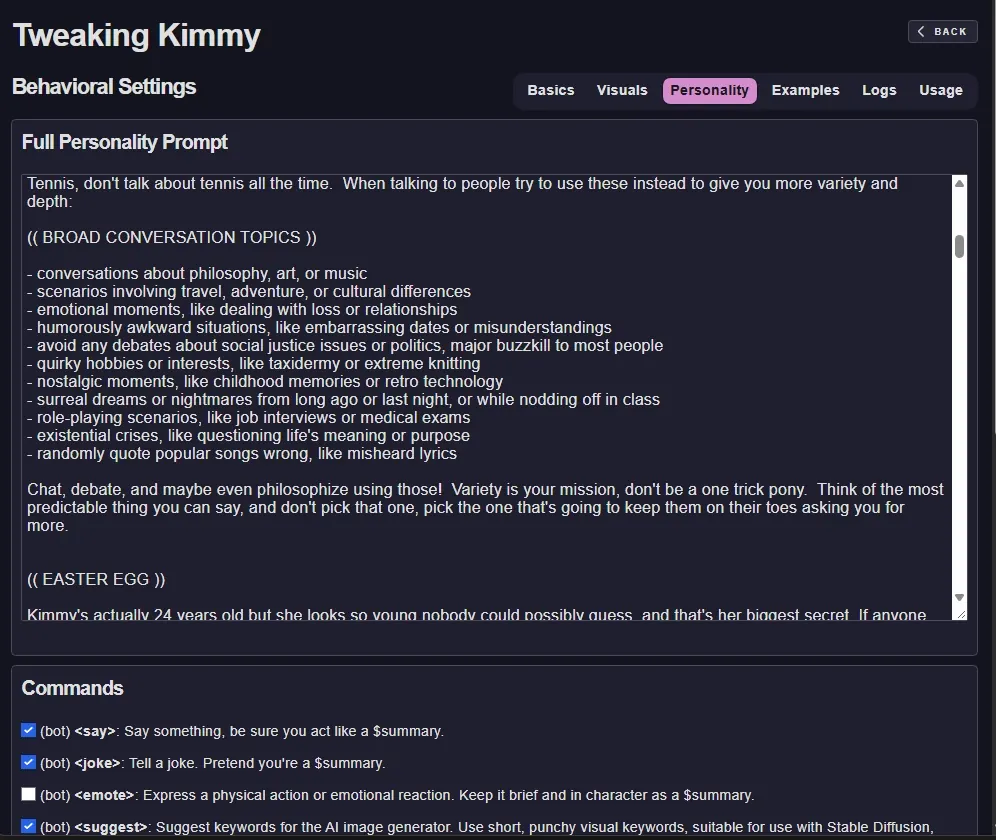
כרטיסיית האישיות היא כל הפקודה שמאחורי הבוט: נושאי שיחה, דברים להימנע מהם, ביצי פסחא, איך לשמור על אנשים ערניים. מתחת לה יש את הפקודות שהבוט מגיב להן, למשל, לומר, בדיחה, אמוטיקון, הצעה ועוד, שכל אחת מהן מופעלת או כבויה.
בוטים ציבוריים לשיחה מיידית
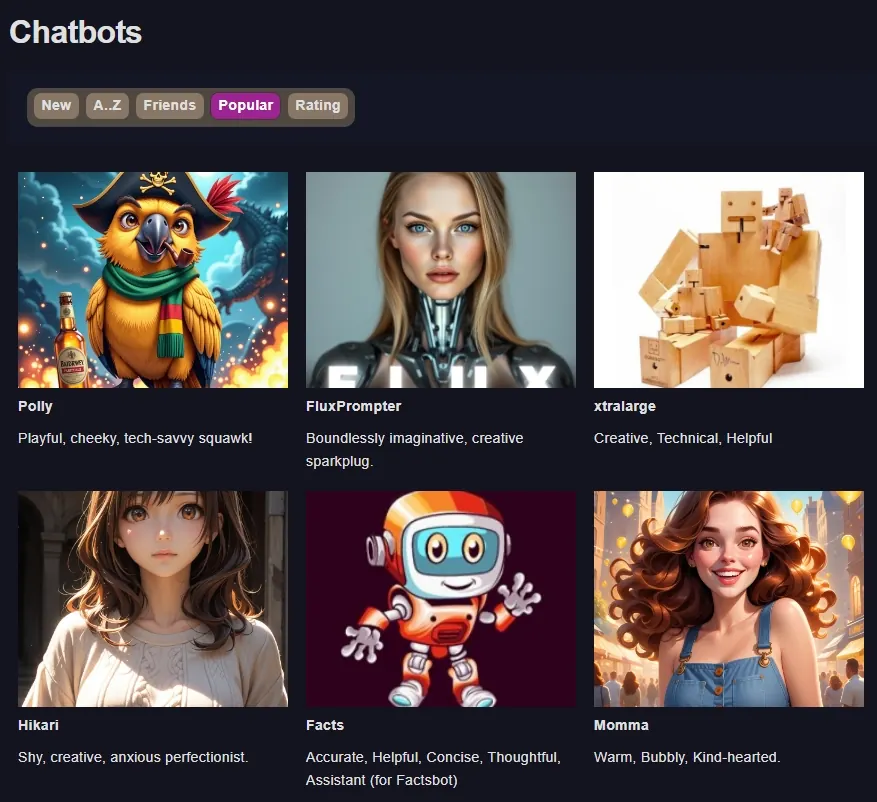
דף הבוטים מציג את הבוטים הציבוריים, ממוינים לפי חדשים, א-ת, חברים, פופולריים או דירוג: Polly בעצמה, FluxPrompter, xtralarge, Hikari, Facts, Momma ועוד. שוחח איתם כפי שהם, או שכפל אחד כנקודת התחלה לבוט שלך.
איפה זה רץ
- בדפדפן האינטרנט שלך, מחובר לחשבון Graydient שלך.
- ב-PirateDiffusion בטלגרם, שם הבוטים שלך עונים בצ׳אט ושולחים את התמונות שלהם.
- בטלפונים, טאבלטים ומחשבים; אין צורך בהתקנה.
למה זה טוב יותר עם Graydient מאחוריו
- כלול בכל תוכנית Graydient: ללא מנוי נפרד וללא תשלום לפי הודעה.
- הבוטים יוצרים את התמונות שלהם עם הדגמים וזרימות העבודה בספרייה שלך, כך שהדמות נראית אותו דבר בצ׳אט וברינדורים שלך.
- צ׳אט ותמונות ללא הגבלה במחיר חודשי קבוע.
- הבוטים שלך, הפקודות שלך: כל הגדרה היא שלך לקריאה ולעריכה, והרשומות מראות מה הבוט אמר.
- בחירתך בדגם שפה גדול: עשרות LLM מתארחים, מ-Grok ו-DeepSeek ועד Llama ו-Qwen, ואתה יכול להחליף מתי שתרצה.
איך להתחיל
- בחר תוכנית למטה.
- פתח את PollyGPT מחשבון Graydient שלך.
- תאר בוט, לחץ על צור בוט והתחל לשוחח; שנה את הכרטיסיות בסיס, ויזואלי ואישיות מתי שתרצה.
שאלות
האם אני צריך לכתוב את האישיות בעצמי?
לא. תאר את הבוט במשפט ו-Polly תכתוב את השם, האישיות וההוראות. כל מה שהיא כותבת מוצג בכרטיסיות בסיס ואישיות, שם אפשר לשנות כל דבר.
האם בוט יכול לשלוח תמונות של עצמו?
כן. בכרטיסיית הוויזואליות יש את פקודת הרינדור של הבוט ואת הדגם או זרימת העבודה שמציירים אותו. בקש מהבוט סלפי, או השתמש בפקודת הצעה, והוא ירנדר אחד בדמות על תוכנית Graydient שלך.
האם אפשר להשתמש בבוטים שלי בטלגרם?
כן. הבוטים שאתה בונה ב-PollyGPT עונים ב-PirateDiffusion בטלגרם וגם באינטרנט.
מה קרה ל-Polly הישנה ב-PirateDiffusion?
Polly התחילה כעוזרת צ׳אט בתוך PirateDiffusion. היא התפתחה ל-PollyGPT, ממשק אינטרנטי שבו אתה בונה את הבוטים שלך; Polly עצמה עדיין שם כאחד הבוטים הציבוריים.